OpenClaw AI Assistant: Today, powerful AI agents like OpenClaw are changing the way people work online. Unlike traditional chatbots that simply answer questions, these systems are designed to perform real tasks. They can assist with automation, workflow management, and everyday digital activities. In this article, you will learn what OpenClaw is, how it works, how it compares with tools like ChatGPT, and how you can safely use it as your own AI assistant.
What Is OpenClaw AI?
OpenClaw is an AI agent built to function more like a real assistant rather than a simple chatbot. Most AI tools operate in a basic prompt-and-response format. You ask a question, and the system generates an answer. OpenClaw goes beyond this approach by allowing the AI to actually perform tasks once permission is granted.
Instead of only suggesting solutions, it can help execute digital actions such as generating reports, replying to messages, organizing workflows, or automating repetitive online work. This ability to move from conversation to action makes OpenClaw far more practical for real productivity tasks.
Because of this capability, many people describe OpenClaw as a Jarvis-style AI assistant, closer to a virtual helper than a standard conversational AI tool.
How OpenClaw Is Different from ChatGPT and Other AI Tools
Tools like ChatGPT, Google Gemini, and Claude AI are extremely useful for research, writing, coding, brainstorming ideas, and solving problems. However, they mainly work within a chat interface where they generate text or guidance based on prompts.
OpenClaw is designed around the concept of action-based AI, which means it focuses on doing tasks rather than just explaining them.
One key difference is that OpenClaw can be installed locally on your own computer or server, giving users more control over how it runs. It can also integrate with communication platforms such as WhatsApp, Telegram, or Slack, allowing you to interact with your AI assistant directly through chat.
Another important feature is persistent memory. This allows the AI to remember your preferences, habits, and past interactions so it can become more helpful over time. With the right system permissions, it can also execute real tasks automatically.
Because of these features, OpenClaw becomes more than just a question-answering tool. It becomes part of your daily workflow, helping automate tasks and improve productivity.
OpenClaw AI Workflow: How a Personal AI Assistant Actually Works
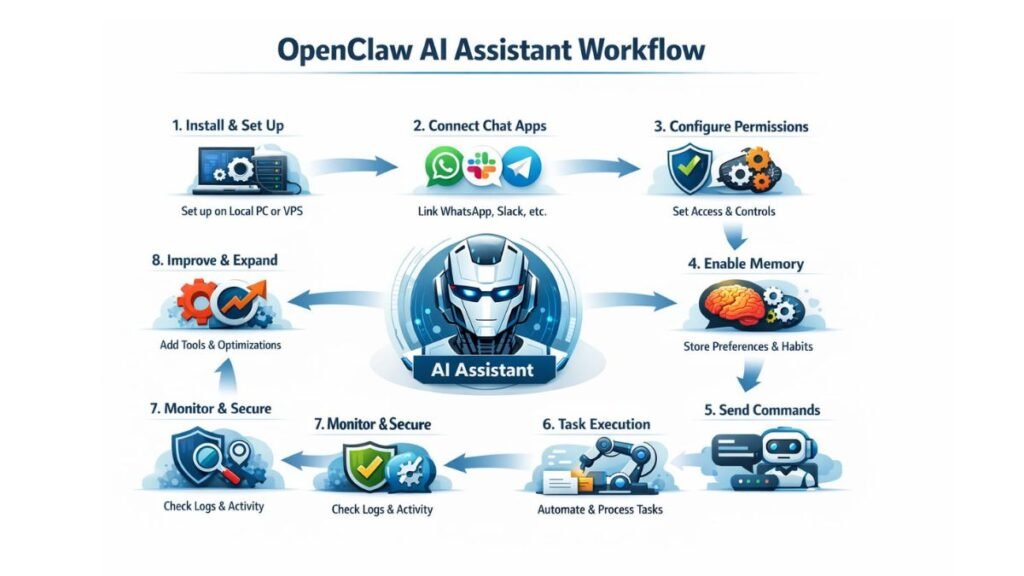
Step 1: Install and Set Up OpenClaw
The workflow begins by installing OpenClaw on a system where it can run continuously. Most users choose either a local computer or a VPS server. A VPS is often preferred because it keeps the AI agent running 24/7 and separates it from personal devices. Once installed, you configure the environment, connect the required AI model, and set basic permissions so the agent can operate.
Step 2: Connect Communication Channels
After installation, the next step is connecting the platforms where you want to interact with the assistant. OpenClaw can integrate with messaging apps such as WhatsApp, Telegram, or Slack. This allows you to communicate with your AI assistant the same way you would message a real person. Instead of opening a dashboard every time, you simply send commands through chat.
Step 3: Configure Permissions and Access
To perform real tasks, the AI agent needs access to certain tools or systems. At this stage, you define what the assistant is allowed to do. For example, you might allow it to read files, generate reports, access APIs, or manage certain workflows. It is important to grant only the permissions that are necessary so security risks remain minimal.
Step 4: Enable Memory and Preferences
OpenClaw can store persistent memory so it learns your habits over time. In this step, you configure how the assistant remembers tasks, routines, and preferences. For example, if you frequently request daily reports, reminders, or content ideas, the AI can remember these patterns and respond more efficiently in the future.
Step 5: Send Tasks Through Chat Commands
Once everything is configured, the assistant becomes ready to use. You can send instructions through chat, just like messaging a human assistant. These commands might include generating reports, summarizing information, drafting messages, organizing tasks, or automating small workflows. The AI processes the request and executes the task based on its permissions.
Step 6: Task Processing and Automation
After receiving a command, OpenClaw analyzes the request, plans the steps required, and performs the action. This could involve retrieving data, interacting with connected tools, or generating content. The system then returns the result directly in your chat interface.
Step 7: Monitoring and Security Checks
Even though the assistant can operate independently, it should still be monitored. Regularly checking logs, reviewing permissions, and observing system activity helps ensure that everything runs safely. If needed, permissions can be adjusted or restricted to prevent misuse.
Step 8: Continuous Improvement
Over time, the workflow becomes more efficient as the AI learns your preferences and you add more integrations. You can connect additional tools, automate more tasks, and refine how the assistant responds. This gradually turns OpenClaw into a highly personalized digital assistant that supports your daily online work.
Final Workflow Summary
The OpenClaw workflow is simple in concept. You install the system, connect communication platforms, grant controlled permissions, and start giving tasks through chat commands. The AI agent processes those tasks, executes actions, and returns results while learning from your usage patterns.
Instead of just answering questions like traditional chatbots, this workflow allows AI to become part of your real work process, helping automate repetitive digital tasks and improve productivity.